Multi-Clinic Practice Management Software in Canada
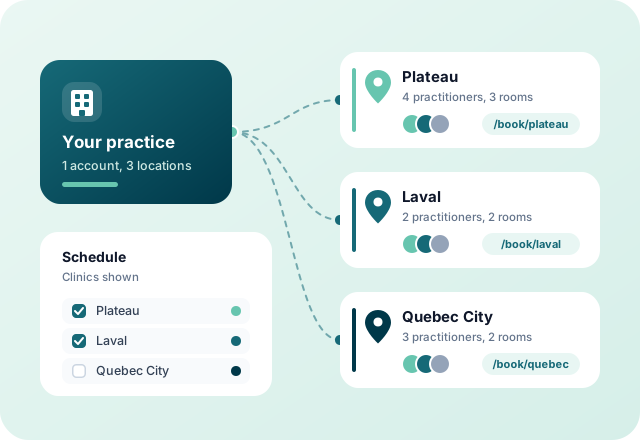
Run several locations, or several practices under one roof, from a single Colib account. Each clinic keeps its own address, team, rooms, appointment types and booking page, while client files, invoicing and reports stay in one place.
One Account for Every Location
Opening a second office should not mean a second software, a second subscription and clients entered twice. With Colib, a new location is a new clinic in the same account.
All Your Clinics, One Login
No separate login or subscription per location. Clients, invoices and reports stay in a single account.
Each Clinic, Its Own Setup
Address, phone, email, practitioners, rooms, appointment types, forms and booking page are set clinic by clinic.
Teams That See Their Clinic
Attach each practitioner or staff member to one or more clinics. They work with the settings of their own locations, while the practice owner keeps the full picture.
What Each Clinic Gets
Shared where it saves you time, separate where each location needs its own rules.
Its Own Contact Details
Each clinic has its address, phone number and email. When a client replies to an appointment, invoice or form email, the reply goes to the clinic concerned.
Its Own Booking Page
Every clinic gets a unique online booking link. Turn direct booking on or off, change the time between available slots or require email verification for one clinic only.
Practitioners and Rooms
A practitioner can work in one clinic or in several. Each room belongs to one clinic, or is available in all of them.
Appointment Types, Forms and Note Templates
Link each appointment type, form and note template to the clinics that use them. Each team only sees what applies to its locations.
Online Payment and Messaging, Clinic by Clinic
Turn off online card payment or secure messaging for one clinic without changing anything for the others.
Your Practice, Clinic by Clinic
Every screen you already use knows which clinic you are working in.
Schedule
Display one, several or all clinics in the schedule, by practitioner or by room. When you book, clients, appointment types, practitioners and rooms are filtered for the chosen clinic.
Client Files
A client can be attached to up to three clinics and keeps a single client file, wherever the next appointment takes place.
Invoices and Payouts
Invoices are tied to their clinic. Practitioners can receive their share of online payments in their own bank account, the balance going to the practice. See billing.
Analytics per Clinic
Filter dashboards and accounting reports by clinic to compare your locations: revenue, appointments, no-shows and new clients.
Access by Location
A team member attached to a clinic only manages the clinics, appointment types, forms and note templates of that clinic, and only sees its numbers in analytics.
Start From Your Current Setup
Already using Colib in one location? When you create your first clinic, everything already set up is attached to it automatically. Then add the next one.
Key features for Clinics in Canada
Our secure EMR platform provides the tools you need to successfully run your practice.

Scheduler
Create appointments in seconds, or allow your clients to book. Two-way Google Calendar & Outlook sync and virtual appointments are available with all our plans.

Charts/Notes
Digitizing your notes and charts is simple and fast with our speech recognition tool and our AI-powered note generation tool ✨.


Easy Booking

Mobile-Friendly
Colib is accessible everywhere from any device, at any time. Your clients get a secure portal.


Receipts & Payments
Facilitate insurance reimbursements with digital receipts and payments with our online card payment system.

Multi-clinic management -- frequently asked questions
Can't find your answer? Contact us.
Which plan includes multi-clinic management?
The Practice Pro plan ($89/month, one full-time practitioner license included, then $40/month per part-time license or $50/month per full-time license). See our pricing.
Can a practitioner work in several clinics?
Yes. Attach the practitioner to every clinic where they work: they appear in the schedule of each of these clinics.
Can clients book at a specific location?
Yes. Each clinic has its own booking page link, which you can share or put on that clinic's website. The general booking page of your practice asks clients to choose a clinic first.
I already use Colib in one location. What happens when I add a second one?
When you create your first clinic, everything already set up (practitioners, clients, appointment types, rooms, schedules) is attached to it automatically. You then create the second clinic and choose what it offers.
Can the staff of one clinic manage the settings of another?
No. A team member attached to a clinic only manages the appointment types, forms, note templates and settings of their own clinics. An account that is not attached to any clinic keeps access to all of them.
Can I compare the results of my clinics?
Yes. Analytics dashboards and accounting reports can be filtered by clinic, so you can compare revenue, appointments and no-shows from one location to another.
Does it work for independent practitioners sharing the same office?
Yes. Each practice or team can be set up as a clinic with its own practitioners, appointment types and booking page, and practitioners can receive their share of online payments directly in their own bank account.
Explore More Colib Resources
Grow to a New Location Without Changing Software
Add your clinics to the same account and keep one client file per client. Start your 30-day free trial -- no credit card required.