Public Webpage for Therapy Practices in Canada
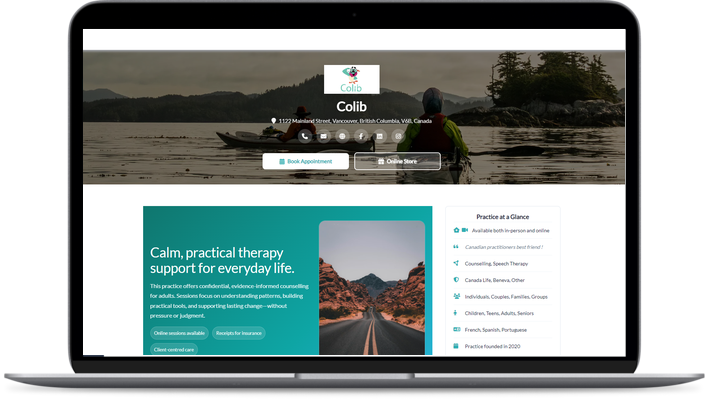
Present your practice on a bilingual public page: who you are, what you treat, where and when, with photos, videos and a contact form, at an address you choose. No website to build, no hosting to manage, and it stays up to date because it is fed by the settings that run your practice.
A Therapist Website Without a Web Project
Many therapists start their practice without a website, and many clinics have one that nobody updates. Colib gives you a public page that is always current, because your address, opening hours and practitioners come straight from your settings.
Your Page, Your Address
Choose your own URL slug on colib.io and print its QR code for the waiting room. The page carries your logo, theme colour, background image and social links.
Always Up to Date
Change your hours, add a practitioner or move to a new office in your settings, and the page follows. There is no second place to maintain.
Share It Everywhere
Put the link on your Google Business Profile, your social profiles, your email signature and your directory listings. One page, one address, every channel.

How to Publish Your Page in Three Steps
No designer, no hosting, no plugin to update.
- Set your branding once: logo, theme colour, background image and social links. They apply to every public page of your practice.
- Write your presentation in French and English, add photos and videos, and fill in the Practice at a Glance profile.
- Choose your URL slug, switch the page on and share the link or the QR code.
What Your Public Webpage Can Show
Everything is optional and bilingual. Turn on what fits your practice.
Presentation in French and English
A rich-text description with formatting, images and videos, written once in each language. Visitors see the version that matches their browser or their choice.
Your Practitioners
Name, title, specialization, bio and photo for every member of the team, or a single profile for a solo practice.
Practice at a Glance
Accepting new clients, year founded, in-person or online, pricing summary, a short quote, plus structured lists: disciplines, types of therapy, areas of expertise, languages spoken, insurers whose receipts you provide, age groups and client types.
Location and Opening Hours
Show your address and opening hours straight from your settings, so the page is never out of date.
Gallery
Photos of your office and videos presenting your approach, for clients who want to know where they are going before the first session.
Contact Form
A CAPTCHA-protected contact form sends visitors' questions to the address you choose, without publishing your email.
Search Engine Settings
Your own bilingual page title and meta description, generated automatically from your profile if you leave them empty, and a switch to keep the page out of search engines if you prefer.
Your Google Tags
Add your Google Tag Manager, Google Analytics 4 or Google Ads IDs to measure visits and conversions on your page, only after the visitor accepts cookies.
Under Your Brand, End to End
White Label
Your logo and colours follow the client from your public page to the client portal, the video room, the forms and the notification emails.
From Reading to Booking
Visitors who are convinced go from your page to your booking page in one click. Online booking has its own settings and its own page: see online booking software.
Included in Every Plan
The public webpage is part of Colib, not an add-on. Plans start at $3 per appointment ($9/month minimum), or $75/month for the Practitioner plan, the better deal from 25 appointments a month. See our pricing.
Key features for Therapists in Canada
Our secure EHR platform provides the tools you need to successfully run your practice.

Scheduler
Create appointments in seconds, or allow your clients to book. Two-way Google Calendar & Outlook sync and virtual appointments are available with all our plans.

Charts/Notes
Digitizing your notes and charts is simple and fast with our speech recognition tool and our AI-powered note generation tool ✨.


Easy Booking

Mobile-Friendly
Colib is accessible everywhere from any device, at any time. Your clients get a secure portal.


Receipts & Payments
Facilitate insurance reimbursements with digital receipts and payments with our online card payment system.

Public webpage -- frequently asked questions
Can't find your answer? Contact us.
Can Colib replace my website?
For many solo practitioners, yes: the public webpage presents the practice, the team, the services and the way to book, in both languages, at an address you choose. If you already have a website, keep it and link to your Colib page or your booking page from it.
Is the page bilingual?
Yes. Description, practitioner bios, page title and meta description all have a French and an English version, and visitors see the language that matches their browser or their choice.
Can I use my own domain name?
The page lives on colib.io under the slug you choose. To use your own domain, point a link or a button from your domain to it.
Can visitors contact me from the page?
Yes. A CAPTCHA-protected contact form sends their message to the email address you set, and your phone number and address are shown only if you choose to display them.
Can I track visitors and conversions?
Yes. Add your Google Tag Manager, Google Analytics 4 or Google Ads IDs. Tags fire only after cookie consent, and conversions such as a submitted form are sent as events.
Can I keep the page private?
Yes. The page can be switched off at any time, and you can ask search engines not to index it while keeping it reachable from your link.
Can I put the link on Instagram or Facebook?
Yes. Share the URL of your public webpage anywhere: social profiles, email signature, Google Business Profile, directories, or the printed QR code.
Explore More Colib Resources
Be Found, in Both Languages
A bilingual public page for your practice, ready in an afternoon. Start your 30-day free trial -- no credit card required.