Practice Analytics & Reports for Therapists in Canada
Know how your practice is really doing: revenue, appointments, no-shows, new clients, projected income and form completion, per practitioner and per clinic. Plus six accounting reports your accountant can open in Excel or PDF.
Decisions Based on Your Numbers, Not on a Feeling
Should you raise your rates, hire a second practitioner, open on Saturdays or stop offering a service? The answer is already in your appointments and invoices. Colib puts it on a chart.
The Whole Practice at a Glance
Dashboards for clients, appointments, finances, shop and forms, drawn from the same data you use every day. No export, no spreadsheet, no double entry.
Per Practitioner, Per Clinic, Per Period
Filter any chart by date range and clinic, and break it down per practitioner, per appointment type or per status. Compare weeks, months or years.
Built for Tax Time
Six reports cover taxes collected, processing fees, refunds, deferred revenue, practitioner payouts and client statements, each exportable to Excel and PDF.
What Your Dashboards Show
Every chart can be downloaded to Excel with its underlying figures.
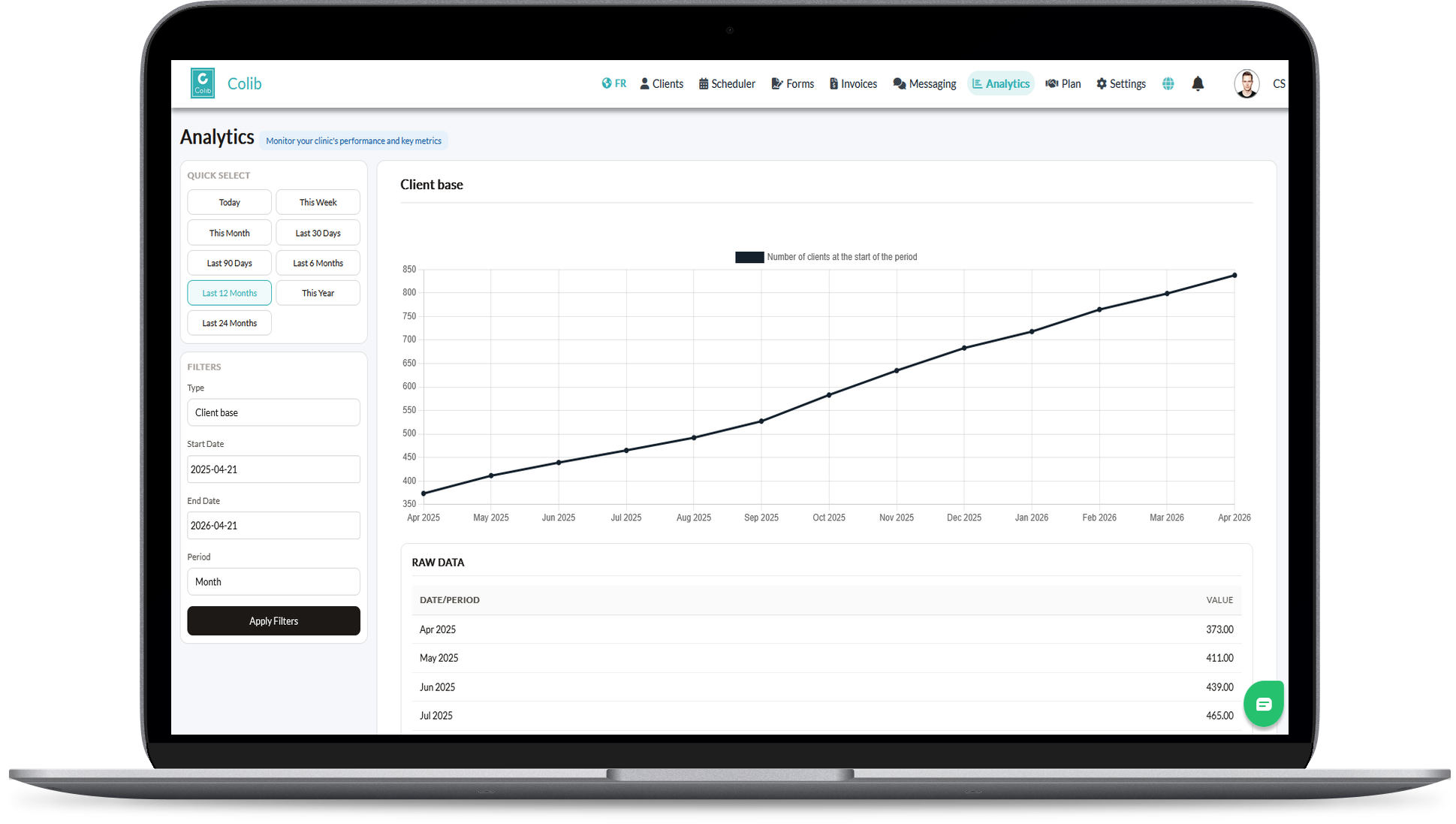
Client Base Growth
New clients over time, to see whether your marketing and referrals are working.
Appointments and No-Show Rate
Total appointments, per practitioner, per clinic, per appointment type and per status, plus your no-show rate, the number to watch when you set up automatic reminders.
Revenue, by Payment Date or Invoice Date
Revenue overall, per practitioner, per appointment type and per clinic, based on invoices or on actual payments, whichever your accountant prefers.
Projected Revenue
Upcoming appointments multiplied by their price, overall, per practitioner and per appointment type, so you know next month's income today.
Shop Sales
Gift certificates and products sold, overall and per type. See inventory and gift certificates.
Form Completion
Forms sent, completed and pending, with the completion rate per form, to spot the questionnaire clients abandon.
Six Reports Your Accountant Will Thank You For
Filter by period, practitioner, clinic and client, view on screen, then export to Excel (real numbers, one sheet per table) or to a branded PDF. Access is a dedicated permission you grant per team member.
Taxes
GST, HST, QST and PST collected, by month and by tax, ready for your remittances.
Processing Fees
Monthly total of card processing fees withheld on online payments, an expense that is otherwise invisible.
Practitioner Revenue
Amount collected versus amount actually transferred to each practitioner's account, for clinics that share revenue.
Liabilities
Unused package credits and remaining gift certificate balances: the revenue you have received but not yet earned.
Refunds and Disputes
Every refund and dispute, with the processing fees still owed, dated by the original payment.
Client Statements
A statement per client for the period, usable as an annual receipt or as proof for an insurer.
Key features for Therapists in Canada
Our secure EHR platform provides the tools you need to successfully run your practice.

Scheduler
Create appointments in seconds, or allow your clients to book. Two-way Google Calendar & Outlook sync and virtual appointments are available with all our plans.

Charts/Notes
Digitizing your notes and charts is simple and fast with our speech recognition tool and our AI-powered note generation tool ✨.


Easy Booking

Mobile-Friendly
Colib is accessible everywhere from any device, at any time. Your clients get a secure portal.


Receipts & Payments
Facilitate insurance reimbursements with digital receipts and payments with our online card payment system.

Analytics and reports -- frequently asked questions
Can't find your answer? Contact us.
Which plans include analytics?
Analytics dashboards are included from the Practitioner plan ($75/month). Invoicing, receipts and the client portal are included in every plan. See our pricing.
Can I see the numbers for one practitioner only?
Yes. Appointments, revenue and projected revenue all exist per practitioner, and reports can be filtered by practitioner, clinic, client and period.
Can I export the data?
Yes. Every chart downloads to Excel with its figures, and every report exports to Excel or to a PDF branded with your clinic's logo, with the period and filters printed on it.
Who can access the reports?
Only team members with the Reports permission. You grant it per person, independently of other administrative rights, so an accountant or office manager can have it without access to clinical files.
What is the client statement for?
It lists a client's paid services over a period. Clients use it as an annual receipt for tax purposes or as supporting proof for an insurance claim they file themselves.
Does the tax report cover GST, QST and HST?
Yes. It breaks down every tax collected per month, whatever the combination of federal and provincial taxes your invoices carry.
Does Colib show my no-show rate?
Yes. The appointments dashboard shows the number and rate of no-shows and late cancellations, per practitioner, per clinic and per appointment type, for the period you select.
Explore More Colib Resources
See Your Practice Clearly
Dashboards and reports come straight from your appointments and invoices. Start your 30-day free trial -- no credit card required.