Secure Messaging for Therapists in Canada
Exchange messages and documents with your clients inside Colib instead of your personal inbox or text messages. Every conversation is encrypted, tied to the client file, logged, and hosted in Canada -- the practical way to meet PIPEDA and Quebec's Law 25 when a client writes between sessions.
Why Email and SMS Are the Wrong Place for Client Messages
A client asking whether to increase their exercises, a parent sending a school report, a note about a panic attack last night: these are health information. Regular email and texting are unencrypted, sit on servers you do not control, and cannot tell you who read what. Colib's messaging fixes all three.
Encrypted and Hosted in Canada
Message text, attachments and even file names are encrypted before they are stored, on servers located in Canada. Message content never goes through a personal mailbox or a consumer messaging app. See our security page.
Authenticated on Both Sides
Clients read and reply from their client portal account, protected by a password and, if they choose, two-factor authentication by email or SMS. A forwarded email can never expose a conversation.
Every Access Logged
Viewing a conversation, sending a message, downloading an attachment, exporting or deleting a thread: each action is written to the audit log with the user, date, IP address and browser.
How Secure Messaging Works in Colib
One conversation per client, in the same place as their appointments, notes and invoices.
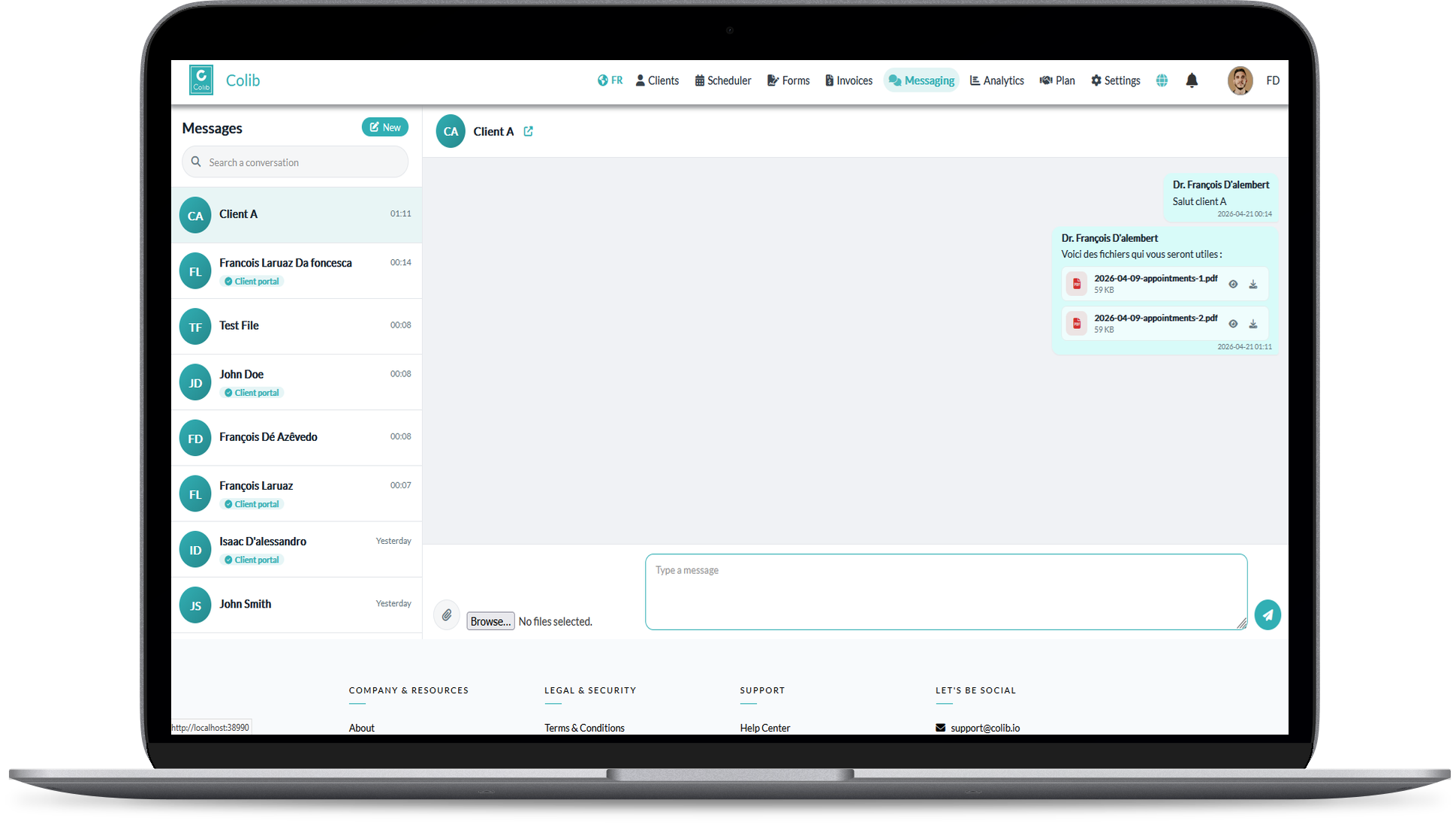
Two-Way Conversations
You write from your Colib inbox; clients write and reply from their portal, on any device. Either side can start the conversation.
Attachments Both Ways
Send an exercise sheet, a report or a follow-up questionnaire; receive a referral letter, a prescription or a school assessment. Files are encrypted and downloadable from the conversation.
Notifications That Do Not Leak
The content stays in Colib: notifications only say that a message is waiting. If a message is still unread after a short while, under two hours, the client or the practitioner receives an email reminder. On your side, a red dot on the Messaging icon shows what is new.
Message Templates
Save the answers you write every week -- directions, a cancellation reminder, homework instructions -- and insert them in one click.
Part of the Client File
Conversations belong to the client record. Export a whole thread with its attachments as a ZIP for a transfer, an access request or your own archive.
On or Off, Clinic by Clinic
Enable messaging from your communication settings, and disable it for a clinic that prefers phone calls. When it is off, clients simply do not see the option.
Bilingual Portal
The portal, its notifications and its interface follow each client's language, French or English.
Messaging With Professional Boundaries
Secure does not mean always on. Colib keeps the channel professional and inside your working hours.
No Personal Number, No Personal Inbox
Clients never see your phone number or email address. The conversation lives in Colib, and stays there when a practitioner leaves the clinic.
Appointment Logistics Stay Automatic
Confirmations, reminders and cancellations are handled by automated notifications, so messaging is reserved for what actually needs a human answer.
Included in Every Plan
Secure messaging and the client portal are part of Colib, not an add-on. Plans start at $3 per appointment ($9/month minimum), or $75/month for the Practitioner plan, the better deal from 25 appointments a month. See our pricing.
Key features for Therapists in Canada
Our secure EHR platform provides the tools you need to successfully run your practice.

Scheduler
Create appointments in seconds, or allow your clients to book. Two-way Google Calendar & Outlook sync and virtual appointments are available with all our plans.

Charts/Notes
Digitizing your notes and charts is simple and fast with our speech recognition tool and our AI-powered note generation tool ✨.


Easy Booking

Mobile-Friendly
Colib is accessible everywhere from any device, at any time. Your clients get a secure portal.


Receipts & Payments
Facilitate insurance reimbursements with digital receipts and payments with our online card payment system.

Secure messaging -- frequently asked questions
Can't find your answer? Contact us.
Is secure messaging compliant with PIPEDA and Law 25?
Messages and attachments are encrypted, hosted in Canada, accessible only through authenticated accounts with optional two-factor authentication by email or SMS, and every access is logged. Those are the safeguards PIPEDA and Quebec's Law 25 expect for health information.
How do clients access their messages?
From their client portal account, on a computer or a phone. They receive an email telling them a message is waiting, without the content, and sign in to read and reply.
Can clients send me files?
Yes. Clients attach documents to their messages from the portal. The files are encrypted, listed in the conversation and filed with the client's record.
How will I know a client wrote to me?
A red dot appears on the Messaging icon in Colib and you receive a notification. If the message is still unread after a short while, under two hours, Colib sends you an email reminder. Clients get the same reminder for messages they have not read.
Can I turn messaging off?
Yes. Messaging is enabled from your communication settings and can be disabled at any time, including for a single clinic in a multi-clinic practice.
Can I keep a copy of a conversation?
Yes. Any conversation can be exported as a ZIP containing the messages and their attachments. The export is recorded in the audit log.
Do clients need to install an app?
No. Clients open their portal in any browser, on a phone or a computer, and messages are read and written there.
Explore More Colib Resources
Move Client Conversations Out of Your Inbox
Encrypted messaging with attachments, inside the client file. Start your 30-day free trial -- no credit card required.