Online Forms & Form Builder for Therapists in Canada
Intake, consent, assessments, screening tools, satisfaction surveys, outcome measures: build any form in minutes, or import one from our library of ready-made forms. Clients complete them online and the answers land directly in their file -- encrypted, bilingual and hosted in Canada.
Why Therapists Replace Paper and PDF Questionnaires With Online Forms
A PDF sent by email comes back as a photo, half filled, and someone has to retype it. An online form is completed on the client's phone in a few minutes, checked for required answers, signed, and filed in the right chart. The same builder covers every form your practice uses, from the first intake to the last satisfaction survey.
Ready Before the First Session
Send any form by email, share a link or display a QR code at the clinic. Answers are filed in the client's record, and a new client file is created automatically when the person is not in Colib yet.
Encrypted and Hosted in Canada
Answers, signatures and uploaded documents are encrypted and stored on Canadian servers, in line with PIPEDA and Quebec's Law 25. See our security page.
Bilingual by Design
Every title, question and consent text has a French and an English version. Each client fills the form in their own language, and you read the answers in yours.
A Form Builder for Every Form Your Practice Uses
Intake questionnaires, consent to treatment, telehealth consent, assessments, screening tools, follow-up questionnaires, satisfaction surveys: one builder, no coding, and a library to start from.
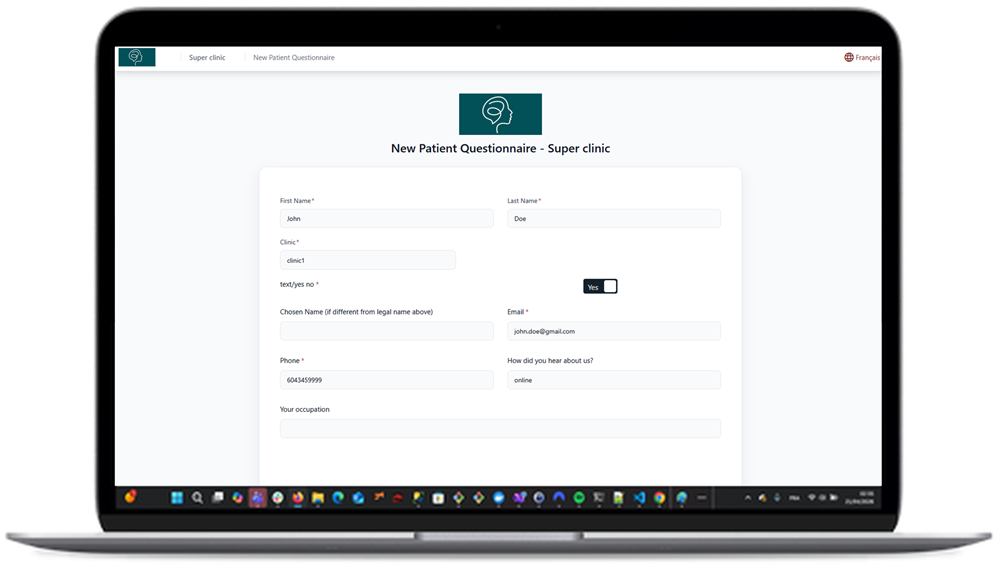
Seven Question Types and Conditional Logic
Yes/no, short and long text, date, single and multiple choice lists, and encrypted document upload. Show or hide a question depending on a previous answer, so clients only see what applies to them.
Electronic Signature and Consent
Add your own attestation text, a client signature, an optional second signature for a parent or partner, a typed name, and a practitioner counter-signature. Signatures are encrypted with the rest of the form.
A Library of Ready-Made Forms for Any Clinic
Import intake forms, consent forms, assessments and questionnaires from the Colib library in one click, then adapt them to your practice. You can also start from scratch, or upload an existing Word or PDF questionnaire and let Colib extract the questions for you.
Answers Fill the Client File Automatically
Map a question to a client field -- name, phone, address, or any custom field you created -- and the chart is updated when the form is submitted. No copy and paste.
Recurring Questionnaires and Automatic Reminders
Send an outcome measure or a check-in form again every X days, from 1 to 400, and let Colib remind clients who have not completed a form yet.
Send to a Group of Clients at Once
Pick a form and a list of clients, write one message, schedule the date and time, and every client receives their own personal link.
Scores and Goals Sections
Collect outcome measures inside a form and track them over time in the client file, with dated entries and progress charts.
Encrypted PDF of Every Completed Form
Each submission is also stored as an encrypted PDF in the client's documents, ready to print or include in a file export.
Privacy Options Built Into Every Form
Collecting health information comes with obligations. Colib gives you the settings to meet them without extra work.
With or Without a Client Account
By default, clients fill a form from its link without creating anything. For sensitive forms, require a client portal account so the person is authenticated before answering.
Ephemeral Screening Forms
For pre-screening questionnaires, enable automatic deletion of submissions 31 days after completion, so you never keep more personal information than you need.
Included in Every Plan
Forms, signatures and recurring sending are part of Colib, not an add-on. Plans start at $3 per appointment ($9/month minimum), or $75/month for the Practitioner plan, the better deal from 25 appointments a month. See our pricing.
Key features for Therapists in Canada
Our secure EHR platform provides the tools you need to successfully run your practice.

Scheduler
Create appointments in seconds, or allow your clients to book. Two-way Google Calendar & Outlook sync and virtual appointments are available with all our plans.

Charts/Notes
Digitizing your notes and charts is simple and fast with our speech recognition tool and our AI-powered note generation tool ✨.


Easy Booking

Mobile-Friendly
Colib is accessible everywhere from any device, at any time. Your clients get a secure portal.


Receipts & Payments
Facilitate insurance reimbursements with digital receipts and payments with our online card payment system.

Online intake forms -- frequently asked questions
Can't find your answer? Contact us.
Do clients need an account to fill out a form?
No. By default a client opens the link you sent and fills the form directly. You can require a client portal account for a specific form when you want the person authenticated first.
Are the answers encrypted?
Yes. Answers, comments, signatures and uploaded documents are encrypted before being stored, on servers located in Canada, and every access to a completed form is logged.
Can I use my own consent form?
Yes. Paste your consent wording in a content section, add your attestation text next to the signature, and add a second signature or a practitioner counter-signature if your order requires it.
Can a questionnaire be sent automatically at regular intervals?
Yes. Choose a form and a client, set the interval in days, and Colib sends it again on schedule. Clients who have not completed a form receive a reminder.
Is there a library of ready-made forms?
Yes. The Colib library offers intake, consent, assessment and follow-up forms that any clinic can import in one click and adapt: rename, add or remove questions, translate, and add your own signature text.
Can I convert my existing Word or PDF questionnaire?
Yes. Upload the document and Colib extracts the questions into an editable form. Automatic extraction can make mistakes, so you review the result before sending it to clients.
Are forms available in French and English?
Yes. Every form carries both languages. The client sees the form in their language, and you read the answers in yours, which matters in Quebec and for bilingual practices across Canada.
Can an intake form be sent automatically to every new client?
Yes. The welcome email sent to each new client can include the intake and consent forms to complete before the first session, and clients who have not finished receive a reminder.
Explore More Colib Resources
Send Your First Online Form Today
Import it from the library or build it in minutes, send it in one click, and meet your next client with a complete file. Start your 30-day free trial -- no credit card required.